Platform
MolAgent has three parts: a daemon on the machine where your calculations run, a workspace you open in a browser or a terminal, and the agent with its simulation procedures.
Architecture
The agent runs on the machine that holds your files and simulation codes. You connect to it from a browser, through the relay or an SSH tunnel.
Your browser or terminal
The MolAgent workspace in a browser, or the command line on the machine itself.
Relay optional
For machines that accept no incoming connections. The daemon connects out to the relay, which forwards encrypted traffic it cannot read.
Your cluster or workstation
Daemon
Agent sessions, terminals and project files, under your user account.
Agent
Simulation procedures, rules for shared clusters and result checks.
Your software and data
Scheduler, simulation codes and project folders, used where they are.
Model provider
Your account with a provider, or an open-weight model on your own server. It receives the conversation and the file excerpts the agent reads.
- Daemon. Runs under your user account on a cluster login node, a workstation or a server. It starts and stops agent sessions, opens terminals, reads and writes project files and keeps the session history. It needs no administrator rights.
- Agent. Each session works in one project folder with the tools available on that machine: shell, files and job scheduler.
- Workspace. A browser application, or the command line on the machine itself. Several people can connect to their own daemons on a shared cluster.
- Relay. Optional, for machines that accept no incoming connections. The daemon connects out to the relay and the browser connects to the same relay. Traffic is encrypted end to end between browser and daemon; the relay forwards it without being able to read it.
- Model provider. The provider account you configure, or an open-weight model installed on your own server.
Workspace
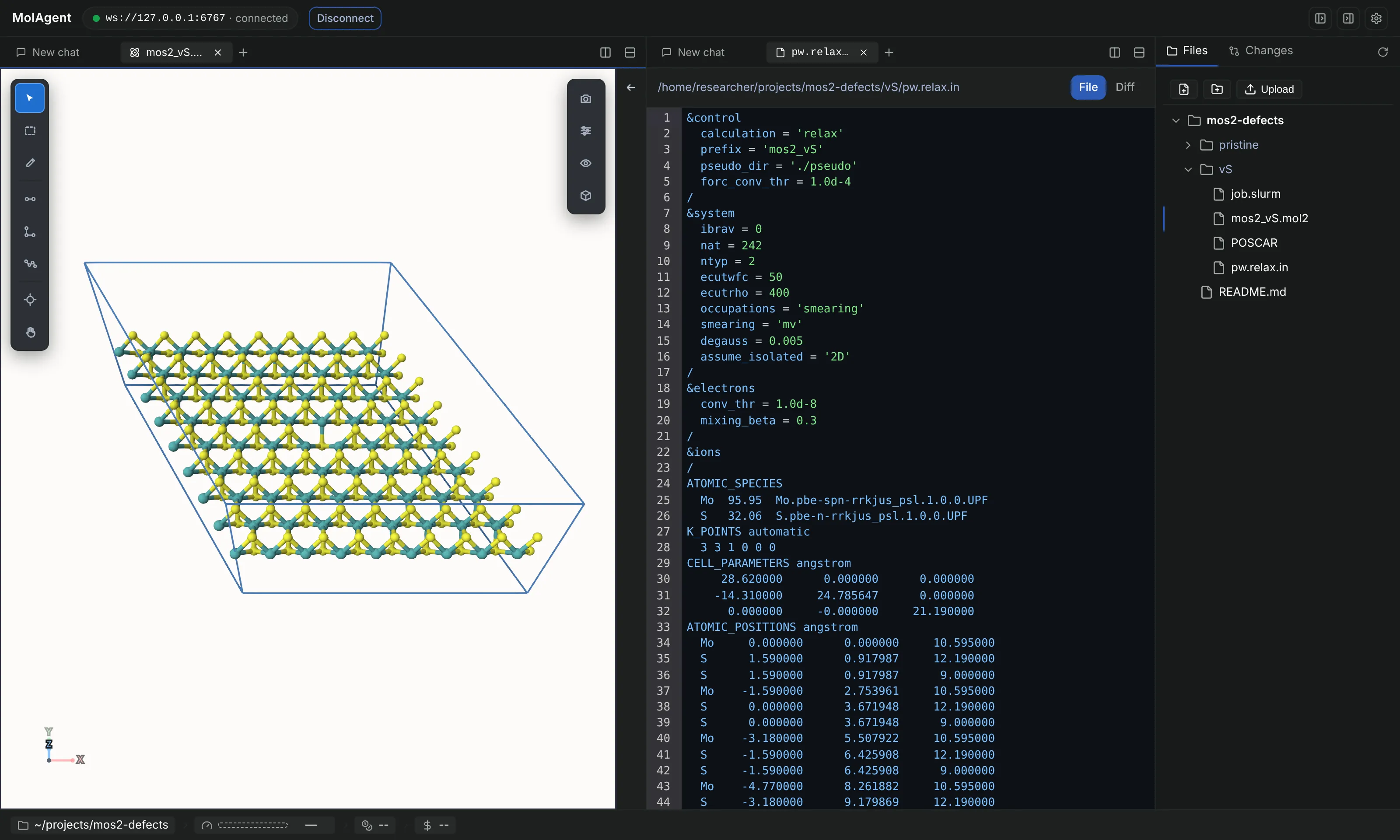
Everything the agent does is visible, and every file it touches can be opened next to the conversation.
- Agent sessions per project, with full history. A conversation can be continued from an earlier point.
- Each action of the agent appears as it happens: files read, edits with their diff, shell commands with their output.
- Questions from the agent appear as dialogs with options to choose from.
- Terminals on the machine where the daemon runs.
- File explorer with upload and download. Structures open in Mol Viewer; images, Markdown, HTML and video open in built-in viewers.
- Split panes for sessions, files, terminals and structures.
- Changes and diffs for projects under git.
Mol Viewer
A 3D viewer and light structure editor for molecules, crystals and simulation boxes, built on the Mol* engine. Files open from the project folder and are read in the browser.
It plays trajectories, draws periodic cells including triclinic ones, builds supercells and infers bonds where a file has none. Atoms can be selected, measured, moved and removed, and the structure exported in a standard format.
- Structures
- PDB, mmCIF and CIF, SDF and MOL, MOL2, XYZ and extended XYZ, POSCAR and CONTCAR, XSF, GROMACS .gro, LAMMPS data files
- Quantum chemistry
- Gaussian input and output files
- Trajectories
- LAMMPS dump, multi-frame XYZ and extended XYZ, animated XSF
- In development
- XTC, TRR and DCD trajectories; ORCA, Quantum ESPRESSO and VASP outputs; cube files and charge densities
- Export
- PDB, mmCIF, MOL, MOL2 and XYZ
Calculations
MolAgent uses the scheduler, software and storage you already have. It ships no scientific binaries.
- Clusters. Jobs go to SLURM, PBS or LSF with the account, partition, queue and walltime limits set for your project.
- Workstations and servers. Jobs run directly on the machine, with MPI where the code supports it.
- Your installed codes. Programs are called through environment modules, Apptainer or Singularity containers, conda environments or explicit paths.
- Readiness check. Reports which codes are found on a machine and which procedures can run there.
- Dry run. Writes every input and job script without submitting anything, for review.
- Login-node guard. Heavy commands on a cluster login node are blocked or need your confirmation. The policy is configurable.
Models
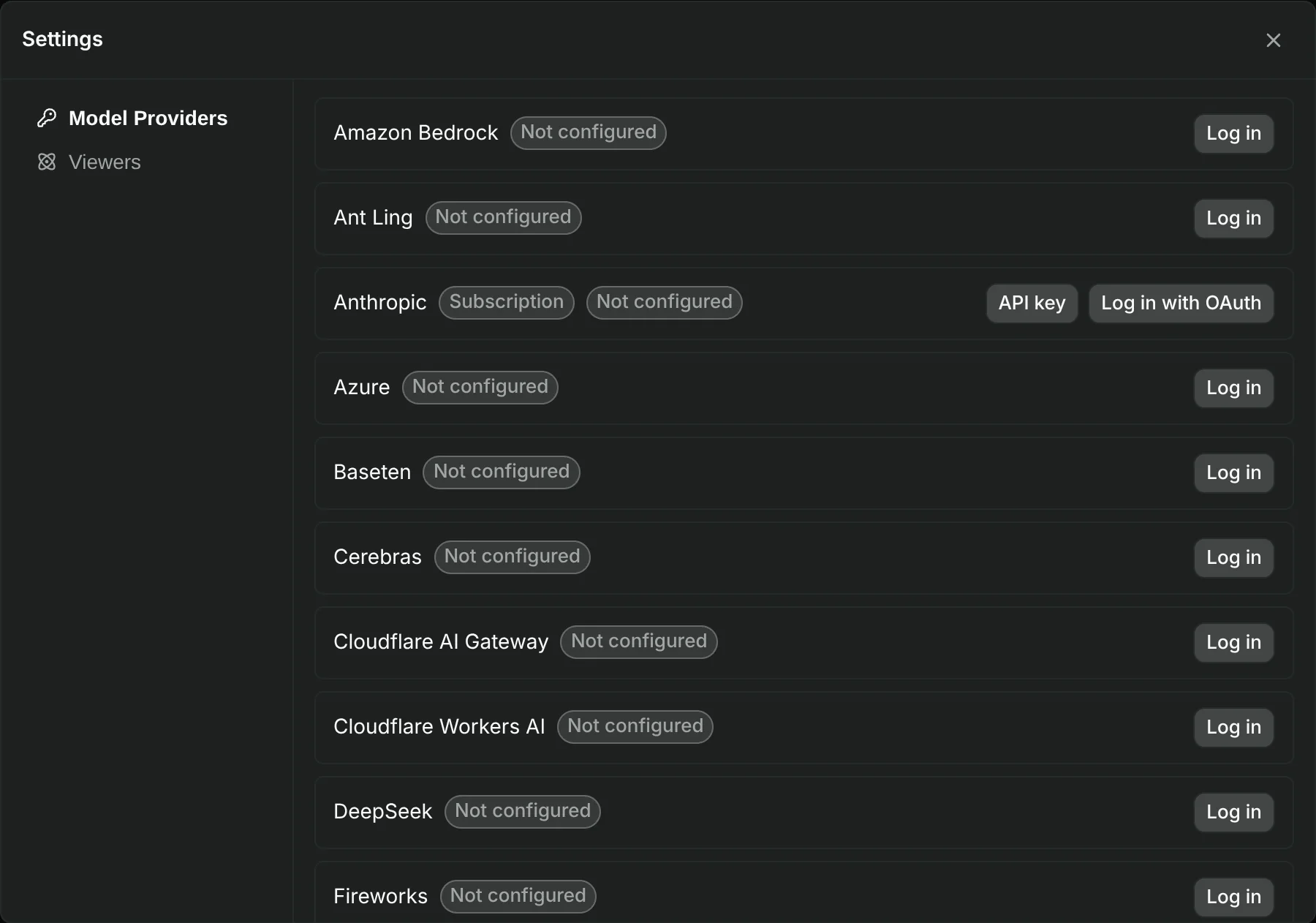
Configure a model provider in the workspace settings or from the command line. Supported providers include Anthropic, OpenAI, Google Gemini and Vertex AI, Mistral, Amazon Bedrock, Azure, OpenRouter, DeepSeek and Groq.
Most providers use an API key. Some also offer sign-in with an existing subscription; check the provider's terms for use in third-party tools.
For industrial installations, MolAgent deploys an open-weight model on your server or on a dedicated server.
Data and security
What stays on your machines and what leaves them.
- Stored on your machines: calculations, input files, outputs and session history. The daemon reads and writes project files in place.
- Sent to the model provider: the conversation, including the file excerpts and command outputs the agent reads to do its work. For confidential projects, use a self-hosted model.
- Remote access: through the relay, traffic is encrypted end to end between your browser and the daemon. Without the relay, the daemon listens on the local machine (127.0.0.1) by default and is reached through an SSH tunnel.
- Access control: on relay connections, the pairing link issued by the daemon is the credential; rotating the daemon key revokes every link. Direct connections are checked against a connection password when one is set. On a shared login node, set one: other users of the same node can reach its local ports.
- Credentials: model provider keys and tokens are stored on the machine where the daemon runs, not in the browser.
Open-source components
| Component | Role | Licence | Source |
|---|---|---|---|
| Workspace | Daemon, relay, browser application and command line | AGPL-3.0 | GitHub |
| Mol Viewer | 3D viewer for molecules, crystals and trajectories | MIT | npm |
| pi | Agent runtime: tools, sessions, model providers | MIT | pi.dev |
| Mol* | WebGL rendering engine used by Mol Viewer | MIT | molstar.org |
Early access
MolAgent is in alpha. We are installing it with a small number of research groups now; a private beta opens in 2027. Write to us with the systems you study, the codes you use and the machines you compute on.
Or write to contact@molagent.ai.